Entering the day's figures
How the Business Summary works, what each figure is for, and why blank is not the same as zero.
Section 01 Business Summary is where the day's numbers go: sales, damage, voids, discounts, cash difference and whatever else has been set up for your business. One column per site.
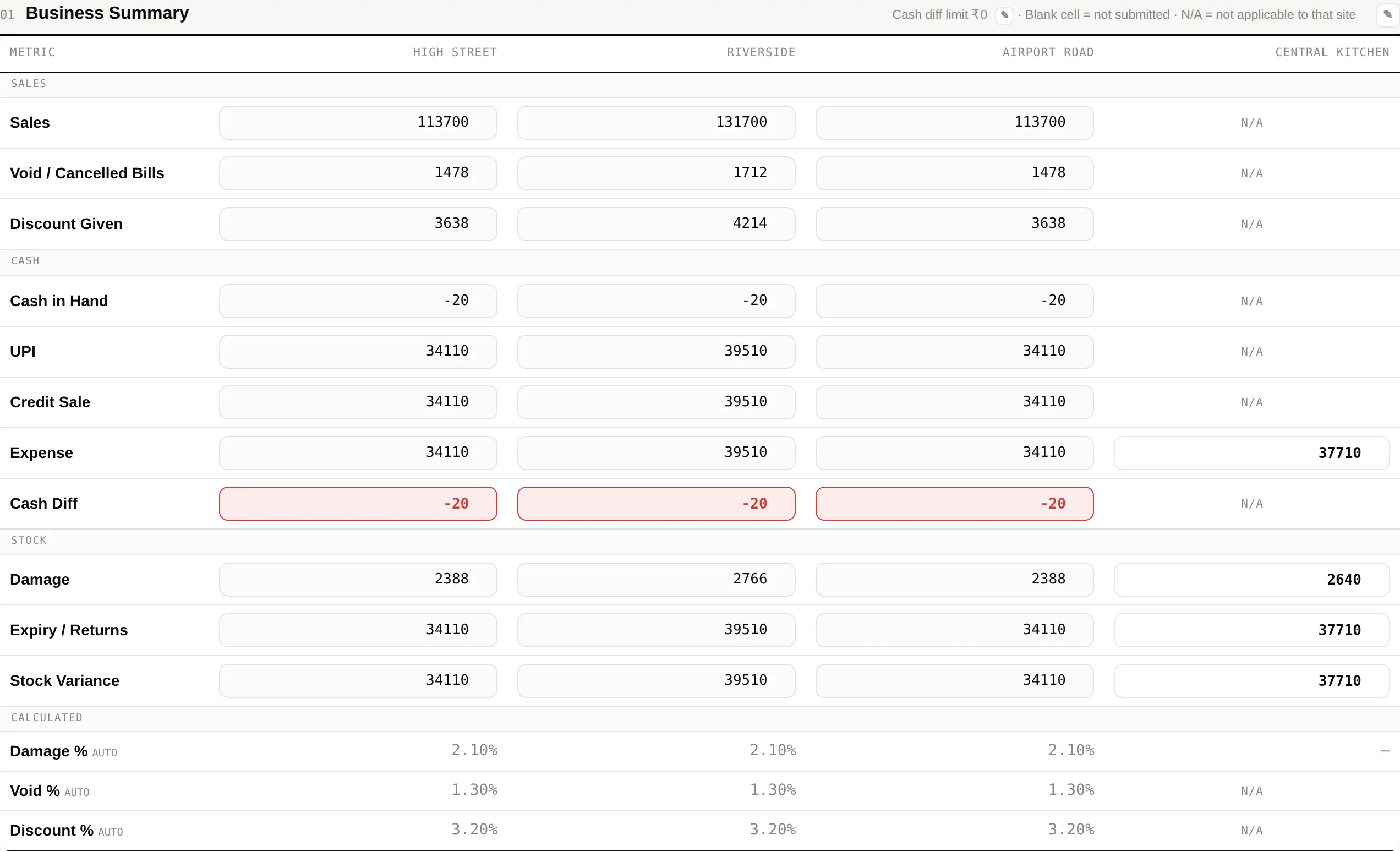
- Click a cell and type the number. There is nothing to save — it is kept as you type.
- Leave a cell blank if there is genuinely no figure. Blank means "not submitted"; typing 0 means "we counted, and it was nothing". The dashboard treats those very differently, and it matters.
- Cells marked N/A do not apply to that site and cannot be typed into.
The figures the dashboard watches
| Sales | The base most other figures are measured against — damage as a percentage of sales, voids as a percentage of sales, and so on. |
|---|---|
| Damage / wastage | Compared against your damage limit. Over it, and the site appears in Alerts. |
| Voids and discounts | Watched as a share of sales, because the number alone means nothing without the day's takings beside it. |
| Cash difference | A shortfall beyond your cash limit is counted as a breach and shows on the site's card. |
| Stock variance | Physical against system. Any real difference is worth explaining on the day rather than at month-end. |
Several of these can be read from figures your accounting system already holds, rather than typed twice. That is set up once, per business.